
Run your secondary school in one place: learners, marks, fees, attendance and parents.
Built for Kenyan Junior Secondary (Grades 7 to 9), Senior School (Grades 10 to 12), and 8-4-4 Forms 3 and 4 until the last KCSE in 2027.
Works in the browser on a laptop or phone. Demo logins are in the demo section below.
Sound familiar?
Many schools still run on a mix of spreadsheets, receipt books and WhatsApp groups. It works, until it doesn't.
Marks in scattered spreadsheets
Every teacher has their own file. Putting together a broadsheet or report cards takes days, and one wrong copy-paste changes a learner's result.
Fee balances nobody trusts
The parent has an M-Pesa message, the bursar has a different figure, and the receipt book says something else. Nobody can show where the difference came from.
Parents hear too late
A learner misses a week of school, or a balance builds up all term, and the guardian only finds out at closing day.
What SEIMS does
One system for the whole school office, with each staff member seeing only the parts their job needs.
School setup
- A four-step setup: school profile, type (day or boarding, mixed or single-gender), classes and streams, terms.
- Menus adapt to your type of school.
- Blist creates your school and invites the principal. The principal invites staff by email.
- Staff profiles hold employer (TSC or BOM), TSC number and ID number.
Learners and guardians
- Admissions with photos. Class lists imported from Excel or CSV.
- Guardians matched by phone number, so siblings are linked automatically.
- Transfers out and readmission. Promotion to the next class at the start of the year.
- Guardian consent recorded under the Data Protection Act.
Academics: CBE and 8-4-4
- Subjects, pathways and grading set up from the curriculum.
- Exams with weights. Subject teachers enter marks per class. Closing an exam locks its marks.
- Broadsheets and results analysis. Ranking under CBE is optional.
- Report cards with CBE ratings, teachers' remarks, term-on-term trend, attendance and fee balance. The principal approves them before anyone sees them. Print PDFs for a whole class at once.
Attendance
- The morning register per class: present, late, absent, excused.
- Class teachers take their own class.
- Guardians of absent learners can get an SMS the same day.
Fees and M-Pesa
- Fee structures per term or at admission, by level or class, broken into vote heads.
- Invoices, receipts and credit notes.
- M-Pesa paybill payments arrive automatically and are matched to the learner by admission number. Unmatched ones wait in a list for the bursar.
- Bank and M-Pesa reconciliation. More on fees.
SMS to parents
- Sent through Africa's Talking, from your school's own sender name.
- Automatic receipts when fees are paid, and absence alerts.
- Notices, fee balance reminders and approved results, sent by staff.
- Buy SMS credits in advance. The balance can never go negative, and failed messages are refunded.
Parent portal
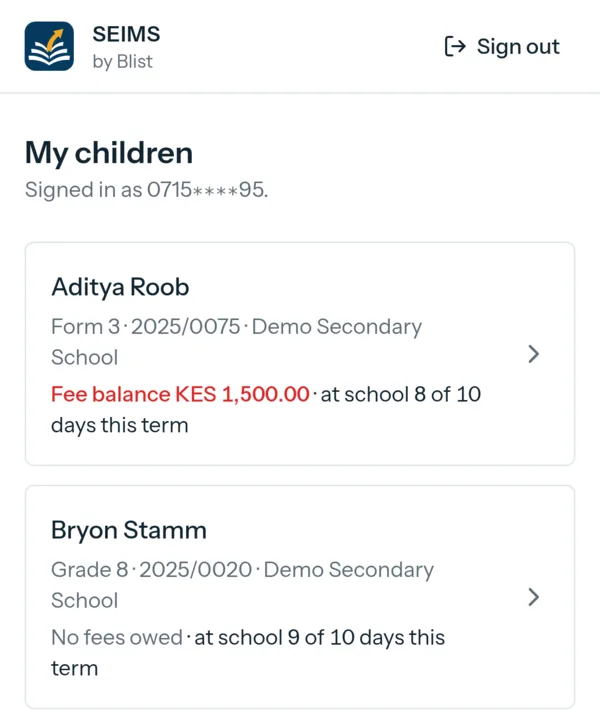
- Parents sign in with their phone number and a one-time SMS code. No password to remember.
- They see each of their children, even in different SEIMS schools.
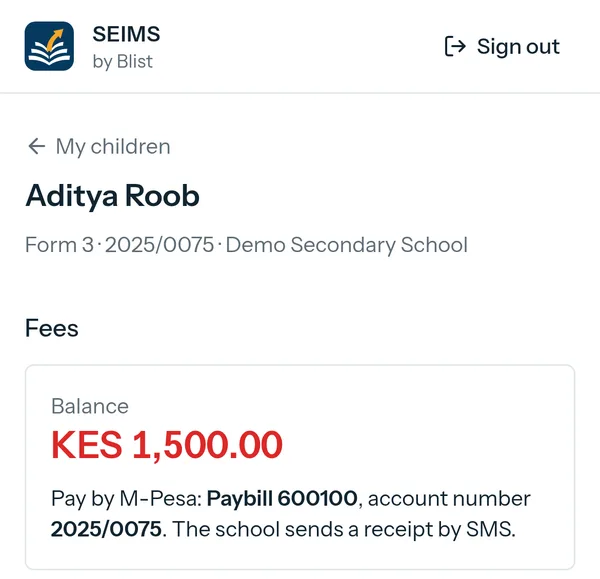
- Fee statements and approved report cards, on their phone.
Reports
- Class lists, attendance, fee collection, defaulters and the activity log.
- A KEMIS learner data worksheet that flags missing details. KEMIS has no bulk upload, so this makes entering data there faster.
- Every report shows on screen, prints, and downloads to Excel.
Phone and offline
- Installs on a phone's home screen like an app.
- Registers and mark sheets keep working without data. How offline works.
A day at school with SEIMS
What changes for the class teacher, the bursar, the principal and the parent.
Register taken on a phone
The class teacher marks each learner present, late, absent or excused. No paper to collect from the staffroom.
Guardians of absent learners get an SMS
The school's own sender name, the same morning, not at the end of term.
A parent pays fees by M-Pesa
They pay to the school paybill with the admission number. A receipt SMS arrives, and the learner's account in SEIMS is updated. The bursar does not type anything.
Report cards approved, then read at home
The principal approves the class's report cards. Only then can parents read them on their phone. Printable PDFs for the whole class are ready the same day.
Fees you can trust
For the bursar and the BOM: the books in SEIMS are kept the way an accountant would keep them by hand.
Every shilling has a trail.
Proper double-entry books
- Real double-entry bookkeeping, as taught in standard accounting texts. Every entry balances.
- Each learner has their own account, so a fee statement is a true record, not a figure someone typed.
- Fees billed ahead of the term are held as unearned until the term opens.
Nothing quietly changes
- Nothing is ever edited or deleted. A mistake is reversed with a new entry, so the trail stays.
- Bad debts are written off properly, and can be reinstated if the parent pays later.
- An activity log records who did what, and when.
M-Pesa without the copying
- Paybill payments arrive on their own and are matched to the learner by admission number.
- A payment with a wrong or missing admission number waits in a list for the bursar to allocate. It is never lost.
- Bank and M-Pesa reconciliation in the same place.
Vote heads and a clean start
- Fee structures broken into vote heads, per term or at admission, by level or class.
- Invoices, receipts and credit notes.
- Balances from your old system brought forward one class at a time.
- Fee collection and defaulters reports, ready for the BOM meeting.
Works on any phone, even offline
SEIMS runs in the browser. On a phone, add it to the home screen and it opens like an app. There is nothing to download from an app store.
When the data runs out in the middle of the register, keep going. Registers and mark sheets keep working without a connection. Saves are queued on the phone and sent when the connection returns.
Parents do not need a smartphone at all. Receipts, absence alerts and notices reach them by SMS on any phone.
Try the demo
Sign in as different members of staff to see what each one does. Open seims.blist-demo.co.ke (opens in a new tab) and use any login below.
| Sign in as | Try this | |
|---|---|---|
| Principal | principal@demo.test |
Approve report cards, see the dashboard, invite staff |
| Deputy | deputy@demo.test |
Exams, mark sheets, results analysis |
| Bursar | bursar@demo.test |
Fee structures, receipts, M-Pesa matching, defaulters |
| Teacher | teacher@demo.test |
Take the register, enter marks |
| Secretary | secretary@demo.test |
Admissions and class lists |
Every password is password
- The demo is a made-up school. All names and numbers are sample data.
- It resets every night, so feel free to change anything.
- No real SMS or email is sent, and M-Pesa runs in Safaricom's test mode.
Pricing
Per learner, per term. No setup fee. Hosting, data import and staff training are included.
Msingi Basic
KES 150per learner per term
- Academics (CBE and 8-4-4)
- Report cards
- Attendance
- Results by SMS
Most complete
Kamili Complete
KES 220per learner per term
- Everything in Msingi, plus:
- Fees
- M-Pesa auto-matching
- The parent portal
- Staff records
- Minimum KES 10,000 per term.
- SMS by prepaid credits at KES 1 per message.
- 10% off when the whole year is paid upfront.
- One free term for referring a school that signs up.
- Billed in week 3 of each term, payable by M-Pesa in up to 2 instalments.
- Pilot schools use SEIMS free for the pilot.
Built properly
The short version for the BOM member who asks how it is built.
Sign-in and roles
Two-factor sign-in (a code on top of the password) is required for admins, principals and bursars. Roles for principal, deputy, bursar, teacher and secretary mean each person sees only what their job needs.
Your data, kept apart
Each school's data is kept separate from every other school's. M-Pesa payment notices are accepted only when they come from Safaricom. Nightly backups, with a copy kept off-site.
Engineering
Built on Laravel, a widely used, well-tested web framework. The fees side uses double entry (every amount is recorded twice, so the books always balance). The code is organised around how a school works (domain-driven design), which keeps the rules for fees, marks and attendance in one clear place. Light, dark and system themes.
Questions schools ask
Does it work for both CBE and 8-4-4?
Yes. SEIMS handles Junior Secondary (Grades 7 to 9), Senior School (Grades 10 to 12) and 8-4-4 Forms 3 and 4 until the last KCSE in 2027. Subjects, pathways and grading are set up from the curriculum each class follows.
Can we bring our existing learner list and fee balances?
Yes. Class lists come in from Excel or CSV. Fee balances from your old system are brought forward one class at a time, so the bursar can check each class as it goes in.
Do parents need a smartphone?
No. Receipts, absence alerts and notices go out by SMS, which reaches any phone. The parent portal is there for parents who do have a smartphone.
What if the internet goes off?
Registers and mark sheets keep working without data. Saves wait on the phone or laptop and are sent when the connection returns.
How do M-Pesa payments reach SEIMS?
Parents pay to your school's own paybill using the learner's admission number. The payment arrives in SEIMS automatically and is matched to the learner. Anything that cannot be matched waits in a list for the bursar.
Who can see our data?
Only your school's staff, and each person sees only what their role needs. Each school's data is kept separate, and learner and guardian data is handled under the Data Protection Act. Read the privacy notice at seims.blist-demo.co.ke/privacy.
Can primary schools use SEIMS?
Not yet. Primary school support is planned for later. Today SEIMS is for Junior Secondary, Senior School and 8-4-4 Forms 3 and 4.
Book a walkthrough
We will take your principal, deputy or bursar through SEIMS using your own classes, streams and fee structure, and answer the BOM's questions. Call, WhatsApp or email us. We reply within one business day.
Prefer to look first? Open the demo (opens in a new tab). Our office details are on the contact page. Monday to Friday, 08:00 to 17:00.